For the last couple of years I've been listening a lot of podcasts, and some of them I still listen to as soon as they have a new episode. Once you get up to a few hours of newly produced podcasts per week you have to find every possible time you can to listen to them. The time it takes to walk, bike or commute somewhere is great. I usually put my headphones on as soon as I go out alone, or if working on my own on something mundane like laundry or dishes. Listening while working is pointless since I either stop writing code, or stop listening. The podcasts listed below all demand full focus from the listener if you are to learn anything from them.
Digital Planet
Digital Planet from BBC is an easy going technology podcast that will discuss the latest general news in the IT area. Usually quite short and not very technical, but a good news update anyway.
In Our Time With Melvyn Bragg
This is another high quality BBC podcast, but it is quite "high brow" compared to Digital Planet and very broad in it's content. The episodes usually consist of a small group of British professors, together with the fast speaking host Melwyn Bragg, talking for an hour about anything from quantum mechanics to philosophy, or some major historic event. Very educating, but not a podcast to listen to when you are tired.
Linux Outlaws
Linux Outlaws is produced by Dan and Fab and is a humorous show about all kinds of Linux related news. It's lighthearted and I usually laugh out loud several times per episode. It is a fun way to keep updated on new releases (System Rescue CD?) and other Linux community information. The typical discussions usually include something like this:
Fab - "It's crap! I'll cut their balls off!"
Dan - "Yeah, let's keep an eye on that! Hmm, ok, lets move on then shall we."
LinuxLink Radio
LinuxLink Radio is a podcast about embedded Linux development produced by TimeSys. It is a highly technical show and usually each episode goes through a solution to a specific problem that you might run into when working with embedded Linux devices. Very informative and a news update on the embedded world.
SALT - Seminars About Long Term Thinking
The Long Now Foundation invite some great speakers and they always have very interesting speakers. The podcasts are usually over an hour and usually start with Stuart Brand introducing the speaker and topic of the evening. Unfortunately some presentations are a bit too image focused and because of that hard to follow as a podcast. At the end of each presentation Kevin Kelly asks the questions collected from the audience during the presentation. The shows are not that many, and they are all worth listening to. They will make you think about time with a different perspective.
Science Talk - The Podcast of Scientific American
This podcast is closely connected to the Scientific American magazine and usually discuss the articles comming in the next paper issue with the author of each article. My favorite part every week is the bogus news quiz where they list four strange news stories and you have to guess which one is false.
Software Engineering Radio - The podcast for professional software developers
If deep and highly technical podcasts about software development suits your taste, this is your podcast. Sometimes it might feel a bit too abstract or a very narrow topic, but you will defenitely learn a lot. There's quite a big archive over at the SE-radio site.
The Java Posse
Java Posse is one of the longest running podcasts I listen to and currently they're at episode number 276! Tor Norbye, Carl Quinn, Dick Wall and Joe Nuxol do the talking and the episodes vary from recordings of discussion panels and interviews, to theme episodes and pure news updates. The tone is cheerful and full of jokes and not always on topic, but that's a good thing.
This American Life
If you like long detailed stories, this is the podcast for you. The show consists of one or more interviews per episode about a certain type of life changing event. A high quality production.
Three Moves Ahead
This is a strategy gaming podcast from Flash of steel where Troy Goodfellow, Tom Chick, Bruce Geryk and Julian Murdoch discuss boardgames and computer strategy games. There's a lot of "in-jokes" and references to old games and the tone is very casual. Even if I'm not much of a gamer any more, it's still interesting to stay up to date on what is happening in that area.
WNYC's Radio Lab
This extremely well produced podcast from WNYC is hosted by Jad Abumrad and Robert Krulwich. They talk about a wide variety of scientific subjects and use a lot of sound effects and music. It is a podcast suitable to everyone since the language used is very clear and the topics are all interesting.
Word of Mouth
This is the podcast version of the long running Word of Mouth radio show from NHPR. It feels more like a normal radio show than a typical podcast and have a good mix of quick news and deep interviews.
I gladly recommend all the podcasts mentioned above and they are worth every minute it takes to listen to them.
2009-08-28

2008-12-22
Beyond basic Vim usage
I have used Vim for about 8 years now, but for quite a while I didn't use the "vee-eye" key mapping the way it should be used. All I did was press i to go to Insert mode, type the text and then Esc:wq to save and quit. That's completely the wrong way to use this wonderful text editor. If you are in that situation I hope this Vim introduction can get you past it. After an overview of some settings for the configuration file I will list the commands everyone should know (and some you probably don't really need to know).
Basic configuration
To be able to use Vim efficiently you have to have some basic configuration set up. In Linux or Unix you should edit ~/.vimrc (Windows specifics last in the post) to include at least the following lines:
File handling
The file handling commands you need to know are:
Movements
A great way to getting started with vim is the built in vimtutor, a text file tutorial you can follow to learn all basic commands in Vim. But to get you up to speed I'll list the basic moves here. Just one comment first. Even though the arrow keys probably work, don't use them! They are slow and you have to move your fingers from the keyboard.
Normal mode and Insert mode
Vim has six basic modes, the most important two being Normal och Insert. Normal mode is the default where you do all the commands and movements and Insert is when you actually type in text. There are many commands related to changing between these two modes:
Usually the fastest way to navigate the cursor is to search for the text you want to go to:
Cut, Copy and Paste
As expected there are many ways to copy and paste text in Vim. The "must know" ones are:
Another great feature with vim is that you can do multiple undo or redo. The commands are:
Fun tricks
A fun thing about vim is that there's always more to learn and a quicker way to do the kind of edit you are trying to do. Some of my favorite tricks are:
In vim you can have more than one file visible in the editor at the same time, either by opening a file in split view or by using vimdiff.
Vim has a lot of key mappings available and it is easy to add your own to your vimrc-file. An example to make pasting text into Vim easier when you have autoindent/smartindent on:
in normal mode will invert the 'paste' option, and will then show the value of that option. The second line does the same in insert mode (but insert mode mappings only apply when 'paste' is off). The third line allows you to press when in insert mode, to turn 'paste' off. This tip and lots of others can be found at the great Vim Wikia.
Vim on Windows
On windows the configuration file is called _vimrc and can be found in your Vim install directory. By default it has some settings already, but you can still add the basic settings mentioned in the beginning of this post. In addition to that you should set nobackup and for fun, remap Ctrl-A and Ctrl-X key bindings to be Ctrl-+ and Ctrl-- on the numpad so that they work. They are used to increase and decrease numbers:
After this post I understand why the Daily Vim blog has a black background everywhere. It is a pain to get black block quotes in blogger to show your nice vim highlights. (Hint; edit the html to use <blockquote style="font-family: courier new; background-color: black; color: white;"><pre></pre></blockquote> around the html generated by TOhtml. Also, remember to remove the superflous tags, :s%/<br //g.)
(The post has been updated after graywh's comment.)
Basic configuration
To be able to use Vim efficiently you have to have some basic configuration set up. In Linux or Unix you should edit ~/.vimrc (Windows specifics last in the post) to include at least the following lines:
Besides these settings I have some more things, mostly related to tabs and indentation:set nocompatible " This is vim, not vi (Put this line first!)
colorscheme koehler " Optional, but I like a black background
set smartcase " Only do case sensitive match on Upper Case
syntax on " Syntax highlight on
set showcmd " Show the command you have typed in
set showmatch " Show matching brackets or parentheses
set wildmenu " Show possible command tab completions
set ruler " Show useful information on the command line
set incsearch " Incremental searching
set hlsearch " Highlight search results. Clear with :nohl
There's a lot more you can configure in the rc-file and there are plenty of good examples on the net, just search.set expandtab " Expand tabs to spaces
set tabstop=4 " 4 spaces is one tab
set shiftwidth=4 " Should be the same as tabstop
set softtabstop=4 " Makes the spaces feel like real tabs
set smarttab " Backspace over expandtab
set autoindent " Use current indentation on next line
set nocindent " Don't use cindent
set nosmartindent " Don't break filetype indent scripts
filetype on " Try to figure out the right filetype
filetype plugin on " Filetype specific plugins
filetype indent on " Filetype specific intenting
File handling
The file handling commands you need to know are:
:w         " Write changes to disk
:w newfile " Write changes to newfile
:w!        " Force write
:q         " Quit
:q!        " Really quit!
:wq        " Save and quit
:wqa! " Really save all files and quit.Movements
A great way to getting started with vim is the built in vimtutor, a text file tutorial you can follow to learn all basic commands in Vim. But to get you up to speed I'll list the basic moves here. Just one comment first. Even though the arrow keys probably work, don't use them! They are slow and you have to move your fingers from the keyboard.
All these moves can be used together with the commands I will describe below and will be referred to with a m. Most moves and actions can be performed with a number in front. 5w means move five words forward. I'll note that number n and a single char with c.h " Left - Moves the cursor one step
j " Down
k " Up
l " Right
gg " Go to the start of the file
G " Go to the end, just like in less
w " Move one word forward
W " Move to next blank delimited word
b " Move one word backwards
B " Move to previous blank delimited word
0 " Go to the beginning of the line
$ " Go to the end of the line
H " Move to the top of the visible screen (Head)
M " Move the cursor to the middle of the screen
L " Move to the end of the screen (Last)
fc " Forward onto the character c on this line
Fc " Backwards onto the character c on this line
tc " Forward to the character c on this line but not on it
Tc " Back to the character c but not on it
nfc " Forward onto the nth c character on this line
Normal mode and Insert mode
Vim has six basic modes, the most important two being Normal och Insert. Normal mode is the default where you do all the commands and movements and Insert is when you actually type in text. There are many commands related to changing between these two modes:
Search and Replacei " Go to insert mode before the cursor position
I " Go to insert mode at the beginning of the line
a " Go to insert mode after the cursor position
A " Go to insert mode at the end of the line
o " Insert a new line below and go to insert mode
O " Insert a new line above and go to insert mode
cm " Delete from the cursor to m and go to insert mode
cc " Delete the whole row and go to insert mode (Change)
C " Change from current position to the end of the line
rc " Replace the character under the cursor with c
Esc " Go back to Normal mode
Ctrl-c " Go back to Normal mode
Ctrl-o " Do one command in normal mode, i.e Ctrl-o$
Usually the fastest way to navigate the cursor is to search for the text you want to go to:
When doing a replace the %s means search every line in the file and the /g means replace all occurrences on the line. Omitting the g means you will only change the first occurrence on the line and. Without the % you only search the current line.
/regex  " Search for a word or a regular expression
*       " Search forward for the word under the cursor
#       " Search backwards for the word under the cursor
n       " Next search match
N       " Previous search match
''      " Two back ticks; Move cursor to where you were before the search

:n      " Go to line number n
:%s/oldtext/newtext/g   " Replace oldtext with newtext in the whole file
:%s/oldtext/newtext/gc  " The same, but confirm each replace
Cut, Copy and Paste
As expected there are many ways to copy and paste text in Vim. The "must know" ones are:
Undo and Redox " Delete the character under the cursor
dd " Delete the current line and put it in the clip board
dw " Delete the word under the cursor
ndj " Delete n rows down and put them in the clip board
D " Delete from here to the end of the line
yy " Yank a line, meaning to copy it
yw " Yank a word
ym " Yank from the cursor to m
p " Paste below or after the cursor
P " Paste before or above the cursor
np " Paste n copies of what you have in the clip board
Another great feature with vim is that you can do multiple undo or redo. The commands are:
u            " Undo once
uu           " Undo two times
Ctr-r        " Redo

:earlier n   " Go to older text state n times
:earlier ns  " Go to about n seconds before
:earlier nm  " Go to about n minutes before
:earlier nh  " Go to about n hours before

:later n     " Go to newer text state n times
:later ns    " Go to about n seconds later
:later nm    " Go to about n minutes later
:later nh    " Go to about n hours later
Fun tricks
A fun thing about vim is that there's always more to learn and a quicker way to do the kind of edit you are trying to do. Some of my favorite tricks are:
Split windows. " The simple dot replays your last command. Very powerful!
r[enter] " Insert linebreak without going into insert mode
J " Append the line below to the current line
qq[do stuff]q " Record the stuff you do in command register q
@q " Replay the action saved in q
@@ " Replay last used action
ci> " Delete between previous <> and go to insert mode
da> " Delete from previous <>, including the tags
^r=(3+4)*5 " Use when in insert mode. Will insert 35 at the cursor
Ctrl-A " Increase the number closest to the cursor with one
Ctrl-X " Decrease the number closest to the cursor with one
~ " Toggle case of the character under the cursor
gum " Lowercase from the cursor to m
gUi> " Uppercase between the previous <>
:TOhtml " Generate html that looks exactly like what you see in vim
g?m " Do rot13 on the movement
z[Ret] " Scroll the window so that the cursor is at the top
zz " Scroll the window so that the cursor is in the middle
z- " Scroll the window so that the cursor is at the bottom
gf " Go to the file under the cursor
K " Look up man page for the word under the cursor
!ls " Run ls in the current working directory
!!date " Replace the current line with the date. Use date /T on Windows
:set number " Show line numbers
:reg " Show what you have in the registers (The clip boards)
Ctrl-g " Show filename and position in file
:Ctrl-r Ctrl-w " Copy the word under the cursor to the : line
In vim you can have more than one file visible in the editor at the same time, either by opening a file in split view or by using vimdiff.
Custom mappings:split " Split the windows horizontally
:sp myfile " Open myfile in a split view
:vsplit " Split the window vertically (:vs works as well)
Ctrl-ww " Move the cursor to the other window
Ctrl-w= " Resize the windows as equally as possible
Ctrl-wc " Close the current window
Vim has a lot of key mappings available and it is easy to add your own to your vimrc-file. An example to make pasting text into Vim easier when you have autoindent/smartindent on:
The first line sets a mapping so that pressingmap <C-s> :w<CR>
nnoremap <F2> :set invpaste paste?<CR>
imap <F2> <C-O><F2>
set pastetoggle=<F2>
Vim on Windows
On windows the configuration file is called _vimrc and can be found in your Vim install directory. By default it has some settings already, but you can still add the basic settings mentioned in the beginning of this post. In addition to that you should set nobackup and for fun, remap Ctrl-A and Ctrl-X key bindings to be Ctrl-+ and Ctrl-- on the numpad so that they work. They are used to increase and decrease numbers:
set nobackup
noremap <C-kPlus> <C-A>
noremap <C-kMinus> <C-X>After this post I understand why the Daily Vim blog has a black background everywhere. It is a pain to get black block quotes in blogger to show your nice vim highlights. (Hint; edit the html to use <blockquote style="font-family: courier new; background-color: black; color: white;"><pre></pre></blockquote> around the html generated by TOhtml. Also, remember to remove the superflous tags, :s%/<
(The post has been updated after graywh's comment.)
2008-11-04
Zeitgeist: Addendum
Zeitgeist: The Movie was by far my favorite “provocative documentary” of 2007, and a month ago a new movie by the same team called Zeitgeist: Addendum was released.
I'd say that this new movie is less provocative and more informative and inspiring than the first one. The topics are still the same, that the banks control the world more than you think, the war on terror is a scam and that religion is just one of many ways to keep the general public from asking too many questions.
Chapter I (0:06:45)
The first fifteen minutes gives a good introduction to the monetary system that controls the world we live in today. The movie goes through how loans and debt is involved in the creation of money and how much power the banks get because of this and makes it clear how the fractional reserve system of monetary expansion gives rise to more inflation. According to the director Peter Joseph, The Federal Reserve is the main culprit behind all of this and the whole purpose is to transfer true wealth from individuals to the banks. It's a system of modern slavery because with the current system, society will never be debt free since the money needed to repay interest on loans can only be created by even more debt.
Chapter II (0:25:10)
This part starts with a very interesting interview with John Perkins, author of Confessions of an Economic Hit Man. The quote shown in the intro of this chapter describes it very well:
Chapter III (0:54:25)
Chapter three of the movie is a long interview with Jacque Fresco of the The Venus Project, extended with commented short video clips. This 92 year old man is looks much younger than he is, and he clearly describes what the Venus Project is all about.
Basically they want to totally redesign our whole culture to be more ethical and humane. The only way to do this, according to Jacque Fresco, is through technology and social awareness. Money, politics and religion are described as false institutions since they can not change the current system. The profit based society we currently have will never be sustainable or efficient because scarcity is the only way to keep the profits high.
Chapter IV (1:32:42)
The last chapter starts with a description of emergence and begs you to challenge your current belief system and become more aware. They ask for intelligent management of the earths resources in a way that can't be done in a monetary system. The later parts of the chapter gives some suggestions of how to combat this monetary system using technology available to us right now. The points listed for moving towards this goal is:
Watch it!
The two hour long Zeitgeist: Addendum movie is packed full of information that will make you think. Even if you don't agree with everything in the movie, you should be provoked enough to question the current structure of our society. The movie is somewhat US-centric, but the implications are still global. Please don't stay ignorant, visit http://www.zeitgeistmovie.com right now and let everyone you know hear about it!
I, for one, await March 15th 2009...
I'd say that this new movie is less provocative and more informative and inspiring than the first one. The topics are still the same, that the banks control the world more than you think, the war on terror is a scam and that religion is just one of many ways to keep the general public from asking too many questions.
Chapter I (0:06:45)
The first fifteen minutes gives a good introduction to the monetary system that controls the world we live in today. The movie goes through how loans and debt is involved in the creation of money and how much power the banks get because of this and makes it clear how the fractional reserve system of monetary expansion gives rise to more inflation. According to the director Peter Joseph, The Federal Reserve is the main culprit behind all of this and the whole purpose is to transfer true wealth from individuals to the banks. It's a system of modern slavery because with the current system, society will never be debt free since the money needed to repay interest on loans can only be created by even more debt.
Chapter II (0:25:10)
This part starts with a very interesting interview with John Perkins, author of Confessions of an Economic Hit Man. The quote shown in the intro of this chapter describes it very well:
The movie shows how often economic threats, corruption and sabotage is used instead of a flat out physical war, mostly because it is way cheaper and much less visible. The later part of the chapter discuss another US favorite topic, terrorism, and what it is really all about.There are two ways to conquer and enslave a nation.
One is by the sword. The other is by debt.- John Adams (1735-1826)
Chapter III (0:54:25)
Chapter three of the movie is a long interview with Jacque Fresco of the The Venus Project, extended with commented short video clips. This 92 year old man is looks much younger than he is, and he clearly describes what the Venus Project is all about.
Basically they want to totally redesign our whole culture to be more ethical and humane. The only way to do this, according to Jacque Fresco, is through technology and social awareness. Money, politics and religion are described as false institutions since they can not change the current system. The profit based society we currently have will never be sustainable or efficient because scarcity is the only way to keep the profits high.
Chapter IV (1:32:42)
The last chapter starts with a description of emergence and begs you to challenge your current belief system and become more aware. They ask for intelligent management of the earths resources in a way that can't be done in a monetary system. The later parts of the chapter gives some suggestions of how to combat this monetary system using technology available to us right now. The points listed for moving towards this goal is:
- Expose the banking fraud by boycotting the banks behind it.
- Boycott the TV news networks and use the internet instead.
- Don't ever join the military. Ever.
- Boycott the energy companies and use renewable energy instead.
- Reject the political system and focus on technology.
- Join the Zeitgeist Movement for social change.
Watch it!
The two hour long Zeitgeist: Addendum movie is packed full of information that will make you think. Even if you don't agree with everything in the movie, you should be provoked enough to question the current structure of our society. The movie is somewhat US-centric, but the implications are still global. Please don't stay ignorant, visit http://www.zeitgeistmovie.com right now and let everyone you know hear about it!
I, for one, await March 15th 2009...
2008-10-30
An open source license primer
Licensing is a tricky issue, especially when it comes to software, and even experienced developers have a hard time knowing what you can and can't do with open source software. I am not a lawyer, but I've been interested in free and open source for a long time and a while ago a colleague and I held a presentation on licenses (Slides in Swedish here) at the company we work for.
To explain what this license thing is all about you need to start with Copyright, which is as old as the printing press. The whole point of copyright is to give the authors of “original works of authorship” the rights for their works so that they have control over how it will be distributed. If someone else want to distribute that piece of work, they need to obtain a license from the copyright holder, usually in exchange for a one time payment or a royalty agreement.
But what if the copyright owner doesn't want the distribution of his or her work to be limited in any way. The first thought might be to put the work into the public domain, meaning that you abandon any claim of ownership of the work. But is this really making it as “free” as possible? What if the piece of work is source code that someone will download, modify in some way and then compile to a binary program to be sold. Is the original piece of code still free?
This leads us to the use of Copyleft licenses where the idea is to use copyright law to prevent any restrictions that would limit the distribution of a piece of work, or modified versions of it.

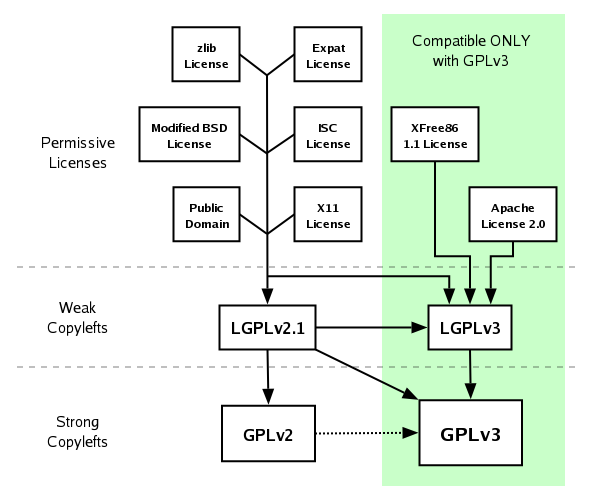
Open source licenses are usually grouped into permissive, weak copyleft and strong copyleft. In the picture above the BSD license is a permissive one, LGPL a weak copyleft and GPL and AGPL are strong copyleft, meaning they include the “Liberty or Death” clause that was introduced in version 2 of the GNU GPL. Of course there are other common open source licenses, and OSI has a nice list of them here, but for simplicity I'll only discuss the ones mentioned above.
There are several versions of the licenses mentioned above and some are not compatible with earlier versions. Since GNU GPL is probably the most common open source license FSF have a chart showing compatibility with the latest version compared to the previous version.

Permissive licenses
It's important to note the word Modified before BSD in the image above. The original BSD license, sometimes called "BSD-old" or "4-clause BSD", had an advertising clause that required authors of derivatives of a BSD-licensed work to include an acknowledgment of the original source. This made it incompatible with GPL, and also unmanageable because so many acknowledgments were required. Code licensed under BSD can be used in closed source projects, as long as a copy of the license is included in the distribution. Other permissive licenses have similar demands.
If you release code for a new protocol or media codec, it might be a good choice to put it under a permissive license because it makes it more likely that companies that are not yet open source friendly will still implement it.
Weak copyleft
If you are using code covered by a weak copyleft license like LGPL, it gets a bit more complex. The GNU Lesser General Public License allows users to link to the LGPL program without having to put their own program under the same license. There are still restrictions, like that you have to make it possible to upgrade the LGPL program to a more recent version and if you modify any LGPL licensed code you have to release the changes.
This type of license is often used in toolkits like GTK+ and media libraries like gstreamer so that they can also be used to build proprietary products and get wider adoption.
Strong copyleft
Strong copyleft licenses like GPL or AGPL are a lot more restrictive when it comes to what you can do to the code. They are called strong because they include the “Liberty or Death” clause, meaning that all the code have to be open. This includes linking into libraries and running the code within the same process. It is precisely because of this strictness that LGPL was created and there is also several exceptions to the GPL covering for example GCC, fonts or the GNU Classpath.
There are two major versions of the GPL, 2.1 and 3. The big differences have been explained succinctly by the FSF and basically concerns these points:
The difference between GPL and AGPL is that AGPL has an extension that covers online services like forums, blogs or online stores. This covers the “legal hole” in the GPL where you are not distributing a program but still provide a service for users over the net using GPL licensed code.
Remember
The important thing to remember is that these copyleft licenses are all distribution licenses and not user licenses. This means you are allowed to modify and use them internally within your company or home without releasing the changes to the code, as long as you do not distribute it in any form. Even if the company doesn't want to release all their code, hopefully they will still contribute to the upstream development of the copyleft code they use.
But if you do distribute code, be sure that it does not violate any of the licenses. It has been proven in court several times by GPL-Violations that a copyleft license has the same legal status as a proprietary license. If you think no one will find out that you are using copyleft licensed code because it's built into the firmware of your product you are probably wrong. There is even a manual written by Armijn Hemel describing how to detect license violations in consumer devices.
To be clear, building an application that runs on top of Linux or an open source application server like JBoss does not mean you have to open the source of your application.
If you plan to use GPL code in any way, do it right and follow the Software Freedom Law Center's excellent Guide to GPL Compliance!
To explain what this license thing is all about you need to start with Copyright, which is as old as the printing press. The whole point of copyright is to give the authors of “original works of authorship” the rights for their works so that they have control over how it will be distributed. If someone else want to distribute that piece of work, they need to obtain a license from the copyright holder, usually in exchange for a one time payment or a royalty agreement.
But what if the copyright owner doesn't want the distribution of his or her work to be limited in any way. The first thought might be to put the work into the public domain, meaning that you abandon any claim of ownership of the work. But is this really making it as “free” as possible? What if the piece of work is source code that someone will download, modify in some way and then compile to a binary program to be sold. Is the original piece of code still free?
This leads us to the use of Copyleft licenses where the idea is to use copyright law to prevent any restrictions that would limit the distribution of a piece of work, or modified versions of it.

Open source licenses are usually grouped into permissive, weak copyleft and strong copyleft. In the picture above the BSD license is a permissive one, LGPL a weak copyleft and GPL and AGPL are strong copyleft, meaning they include the “Liberty or Death” clause that was introduced in version 2 of the GNU GPL. Of course there are other common open source licenses, and OSI has a nice list of them here, but for simplicity I'll only discuss the ones mentioned above.
There are several versions of the licenses mentioned above and some are not compatible with earlier versions. Since GNU GPL is probably the most common open source license FSF have a chart showing compatibility with the latest version compared to the previous version.
Permissive licenses
It's important to note the word Modified before BSD in the image above. The original BSD license, sometimes called "BSD-old" or "4-clause BSD", had an advertising clause that required authors of derivatives of a BSD-licensed work to include an acknowledgment of the original source. This made it incompatible with GPL, and also unmanageable because so many acknowledgments were required. Code licensed under BSD can be used in closed source projects, as long as a copy of the license is included in the distribution. Other permissive licenses have similar demands.
If you release code for a new protocol or media codec, it might be a good choice to put it under a permissive license because it makes it more likely that companies that are not yet open source friendly will still implement it.
Weak copyleft
If you are using code covered by a weak copyleft license like LGPL, it gets a bit more complex. The GNU Lesser General Public License allows users to link to the LGPL program without having to put their own program under the same license. There are still restrictions, like that you have to make it possible to upgrade the LGPL program to a more recent version and if you modify any LGPL licensed code you have to release the changes.
This type of license is often used in toolkits like GTK+ and media libraries like gstreamer so that they can also be used to build proprietary products and get wider adoption.
Strong copyleft
Strong copyleft licenses like GPL or AGPL are a lot more restrictive when it comes to what you can do to the code. They are called strong because they include the “Liberty or Death” clause, meaning that all the code have to be open. This includes linking into libraries and running the code within the same process. It is precisely because of this strictness that LGPL was created and there is also several exceptions to the GPL covering for example GCC, fonts or the GNU Classpath.
There are two major versions of the GPL, 2.1 and 3. The big differences have been explained succinctly by the FSF and basically concerns these points:
- Tivoization - Using crypto hardware to control what code is allowed to run on the device.
- DRM - Restrictions on what code you write and distribute.
- Patents - Using GPL code gives you right to use the patents in it.
- Digital distribution - Physical distribution of the source code is no longer an explicit demand.
The difference between GPL and AGPL is that AGPL has an extension that covers online services like forums, blogs or online stores. This covers the “legal hole” in the GPL where you are not distributing a program but still provide a service for users over the net using GPL licensed code.
Remember
The important thing to remember is that these copyleft licenses are all distribution licenses and not user licenses. This means you are allowed to modify and use them internally within your company or home without releasing the changes to the code, as long as you do not distribute it in any form. Even if the company doesn't want to release all their code, hopefully they will still contribute to the upstream development of the copyleft code they use.
But if you do distribute code, be sure that it does not violate any of the licenses. It has been proven in court several times by GPL-Violations that a copyleft license has the same legal status as a proprietary license. If you think no one will find out that you are using copyleft licensed code because it's built into the firmware of your product you are probably wrong. There is even a manual written by Armijn Hemel describing how to detect license violations in consumer devices.
To be clear, building an application that runs on top of Linux or an open source application server like JBoss does not mean you have to open the source of your application.
If you plan to use GPL code in any way, do it right and follow the Software Freedom Law Center's excellent Guide to GPL Compliance!
2008-07-26
Minix 3.0
Was surprised to see this ad in my Gmail today:

I usually get a lot of Linux and embedded hardware related ads because of the OpenMoko mailinglists, but Minix 3 was really a surprise. I tried running it in VMWare about two years ago after reading a nice introduction to it on OSNews. Can't say I was impressed. It sure didn't look like much back then (and still doesn't, it's just X), but microkernels are very interesting.
There are a lot of L4 kernel based operating systems, and a few of them even run on the Neo1973(Video from here). Hopefully this one will too some day.
There will always be some overhead when using a microkernel compared to a monolithic kernel because of the extra IPC, but the modern implementations are not that far behind. It will be interesting to see how useful the different versions will become, although there's little hope some of them will ever be completed...

I usually get a lot of Linux and embedded hardware related ads because of the OpenMoko mailinglists, but Minix 3 was really a surprise. I tried running it in VMWare about two years ago after reading a nice introduction to it on OSNews. Can't say I was impressed. It sure didn't look like much back then (and still doesn't, it's just X), but microkernels are very interesting.
There are a lot of L4 kernel based operating systems, and a few of them even run on the Neo1973(Video from here). Hopefully this one will too some day.
There will always be some overhead when using a microkernel compared to a monolithic kernel because of the extra IPC, but the modern implementations are not that far behind. It will be interesting to see how useful the different versions will become, although there's little hope some of them will ever be completed...
2008-05-24
Roguelike revival
I played my first roguelike JAMoria on a Mac Classic II somewhere around 1993. It's a classic black and white ASCII game where you run around with a @ using the numpad on the keyboard. In JAMoria you start in a small city, just like the classic Moria. But instead of just having one dungeon, it has multiple dungeons to descend into, both in the town and in the wilderness that surrounds it.
Like all roguelikes, if you died you had to start over again and create a completely new character to play with. Already being familiar with regular table top role playing games, rolling new stats and trying out new race and class combinations was a major part of the fun.
In early 1996, using a blazingly fast 28.8 baud modem I managed to download ADOM 8.1 and install it on my first non Macintosh pc, a Pentium 75Mhz. At first I found the game really hard, and all new characters died after just a few minutes, but I kept trying. After some newsgroup searching I found help in rec.games.roguelike.misc, and later rec.games.roguelike.adom. And I've been playing ADOM ever since. It's a very very difficult game to "win", but just trying to is fun enough. Not much has happened to ADOM since version 1.1.1 in 2002, and by that time the development of all the other rougelikes I knew had gone into maintenance mode or ceased completely.

One reason might be that graphical games were making it impossible to compete. One of my favourites, Dungeon Hack, was early and most roguelike of them all. The much more popular Diablo came later and was not turn based, even if the game mechanics was kind of the same. Of course people tried making graphical front ends to the classic roguelikes with varying success. Falcon's Eye was probably the most known. A fork of that project called Vulture's is still under development and it's a game I have yet to try. (The demo video looks good though!)
To get back to the title of this post; It feel there is a huge revival going on in the roguelike scene. There's new blogs, columns, news pages and games showing up everywhere and older newsgroups and pages like RogueBasin seem to have a surge in activity and popularity. Even the ADOM homepage has gotten a face lift with a new blog about Thomas Biskups new roguelike JADE, and a brand new forum.
I guess that the main reason people enjoy making roguelikes is that the games are full of tricky algorithms like dungeon generation, field of vision, monster AI and more, but still small enough for a single developer to make by themselves. The main reason is of course that there's no graphics and no sound (well, DoomRL has sound), so all the programming effort and processing power can be spent on actual game play instead of bells and whistles. If you know what to do, creating a new game from scratch can be pretty quick. 7 Day Roguelike competitions seems to be more and more popular.
Some are more ambitious than others. The crazy guys behind Dwarf Fortress have quit their jobs to work full time on their ASCII dwarf game simulator. It's not really a classic roguelike, but the features are impressive. Julian Mensch has been working on his Incursion since 1999 and the planned release is in 2011!
All in all, it's a genre of games worth trying, and I guess it's a nice way to learn a new language trying to implement a 7DRL in it. (My attempt in J2ME was never completed though. Take a look at Dweller instead.)
Also, I wonder what's the best way to control a roguelike when you only have a touchscreen. Would be nice to have one for the OpenMoko phone.
Like all roguelikes, if you died you had to start over again and create a completely new character to play with. Already being familiar with regular table top role playing games, rolling new stats and trying out new race and class combinations was a major part of the fun.
In early 1996, using a blazingly fast 28.8 baud modem I managed to download ADOM 8.1 and install it on my first non Macintosh pc, a Pentium 75Mhz. At first I found the game really hard, and all new characters died after just a few minutes, but I kept trying. After some newsgroup searching I found help in rec.games.roguelike.misc, and later rec.games.roguelike.adom. And I've been playing ADOM ever since. It's a very very difficult game to "win", but just trying to is fun enough. Not much has happened to ADOM since version 1.1.1 in 2002, and by that time the development of all the other rougelikes I knew had gone into maintenance mode or ceased completely.

Adom: Terinyo
One reason might be that graphical games were making it impossible to compete. One of my favourites, Dungeon Hack, was early and most roguelike of them all. The much more popular Diablo came later and was not turn based, even if the game mechanics was kind of the same. Of course people tried making graphical front ends to the classic roguelikes with varying success. Falcon's Eye was probably the most known. A fork of that project called Vulture's is still under development and it's a game I have yet to try. (The demo video looks good though!)
To get back to the title of this post; It feel there is a huge revival going on in the roguelike scene. There's new blogs, columns, news pages and games showing up everywhere and older newsgroups and pages like RogueBasin seem to have a surge in activity and popularity. Even the ADOM homepage has gotten a face lift with a new blog about Thomas Biskups new roguelike JADE, and a brand new forum.
I guess that the main reason people enjoy making roguelikes is that the games are full of tricky algorithms like dungeon generation, field of vision, monster AI and more, but still small enough for a single developer to make by themselves. The main reason is of course that there's no graphics and no sound (well, DoomRL has sound), so all the programming effort and processing power can be spent on actual game play instead of bells and whistles. If you know what to do, creating a new game from scratch can be pretty quick. 7 Day Roguelike competitions seems to be more and more popular.
Some are more ambitious than others. The crazy guys behind Dwarf Fortress have quit their jobs to work full time on their ASCII dwarf game simulator. It's not really a classic roguelike, but the features are impressive. Julian Mensch has been working on his Incursion since 1999 and the planned release is in 2011!
All in all, it's a genre of games worth trying, and I guess it's a nice way to learn a new language trying to implement a 7DRL in it. (My attempt in J2ME was never completed though. Take a look at Dweller instead.)
Also, I wonder what's the best way to control a roguelike when you only have a touchscreen. Would be nice to have one for the OpenMoko phone.
2008-05-05
Einstein quote
The fairest thing we can experience is the mysterious. It is the fundamental emotion which stands at the cradle of true art and true science. He who knows it not and can no longer wonder, no longer feel amazement, is as good as dead, a snuffed-out candle. It was the experience of mystery - even if mixed with fear - that engendered religion. A knowledge of the existence of something we cannot penetrate, of the manifestations of the profoundest reason and the most radiant beauty, which are only accessible to our reason in their most elementary forms-it is this knowledge and this emotion that constitute the truly religious attitude; in this sense, and in this alone, I am a deeply religious man. I cannot conceive of a God who rewards and punishes his creatures, or has a will of the type of which we are conscious in ourselves. An individual who should survive his physical death is also beyond my comprehension, nor do I wish it otherwise; such notions are for the fears or absurd egoism of feeble souls. Enough for me the mystery of the eternity of life, and the inkling of the marvellous structure of reality, together with the single-hearted endeavour to comprehend a portion, be it never so tiny, of the reason that manifests itself in nature.-Albert Einstein, The world as I see it
2008-04-17
History in Zsh
Since I use Zsh with shared history, the normal history command doesn't work properly. Instead I came up with this ugly hack using cat and cut:
cm@tyst> cat ~/.zshhistory | cut -c16-40 |awk '{a[$1]++ } END{for(i in a){print a[i] " " i}}'|sort -rn|headand for root:
550 ls
496 cd
322 make
224 vim
168 su
151 screen
105 ssh
91 bitbake
76 rm
58 mtn
root@tyst> cat ~/.zshhistory | cut -c16-40 |awk '{a[$1]++ } END{for(i in a){print a[i] " " i}}'|sort -rn|headGuess it's quite obvious what distro I use on my computer at home and what I spend time doing...
713 emerge
312 vim
247 ls
165 cd
120 screen
108 iptables
83 etc-update
60 top
59 dmesg
53 cp
2008-03-09
Lies
For some strange reason studies of liars seem to pop up all over the net right now. NYmag has a long and very interesting article about why kids lie and how they learn it from their parents. Kids start as early as age 2 or 3, and the smarter the kid the earlier they start lying. Telling the truth is easy, but making a believable lie takes a lot more effort.
The always excellent Radiolab had a show last week about lies where they presented the results from several studies on the subject. They interviewed the famous psychologist Paul Ekman about facial expressions and how to tell if people are lying. The whole concept of microexpressions is fascinating. And Ekman's vow he took when his daughter was born to never lie again seems incredibly difficult to keep.
Another part of the program discusses a study Yaling Yang did on pathological liars. Brain scans of them showed that they had a lot more white brain matter in their prefrontal cortex compared to the control group, but less gray matter. The researchers believed that the huge increase in connections in the brain made lying practically effortless for these individuals and they could reply instantly with a plausible lie.
The radio show continues with a segment about a con-woman called Hope and how she used unsuspicious people by constantly lying.
People who are good at lying are generally more happy and have greater success in life. People with serious depressions are "too realistic" and seem unable to twist the truth into a brighter version. Being able to lie to yourself as well as others have many advantages even when you don't abuse it to the fullest.
I spend a lot of time thinking about how to interact with people and even more observing what people do and how they react. If I had no moral or empathy there's no limit to how much I could take advantage of peoples good will. Most people want to help and trust other peoples "good nature", but I'm afraid there's too many who don't have that in them. I'll be sure to keep my eyes open for the slightest "leakage", be it a microexpression or an inconsistency in the story. Just never let people know you caught them lying, that just makes them more careful next time and harder to catch.
This cynical post is written while listening to Billy Talent - Lies
The always excellent Radiolab had a show last week about lies where they presented the results from several studies on the subject. They interviewed the famous psychologist Paul Ekman about facial expressions and how to tell if people are lying. The whole concept of microexpressions is fascinating. And Ekman's vow he took when his daughter was born to never lie again seems incredibly difficult to keep.
Another part of the program discusses a study Yaling Yang did on pathological liars. Brain scans of them showed that they had a lot more white brain matter in their prefrontal cortex compared to the control group, but less gray matter. The researchers believed that the huge increase in connections in the brain made lying practically effortless for these individuals and they could reply instantly with a plausible lie.
The radio show continues with a segment about a con-woman called Hope and how she used unsuspicious people by constantly lying.
People who are good at lying are generally more happy and have greater success in life. People with serious depressions are "too realistic" and seem unable to twist the truth into a brighter version. Being able to lie to yourself as well as others have many advantages even when you don't abuse it to the fullest.
I spend a lot of time thinking about how to interact with people and even more observing what people do and how they react. If I had no moral or empathy there's no limit to how much I could take advantage of peoples good will. Most people want to help and trust other peoples "good nature", but I'm afraid there's too many who don't have that in them. I'll be sure to keep my eyes open for the slightest "leakage", be it a microexpression or an inconsistency in the story. Just never let people know you caught them lying, that just makes them more careful next time and harder to catch.
This cynical post is written while listening to Billy Talent - Lies
2008-01-28
Schwartz and gllin
For some reason Andrzej "balrog-kun" Zaborowski is still missing from PlanetOpenMoko, so I'll just link to some of his recent posts instead.
Andrzej have written an ELF-loader called Schwartz that can translate OABI to EABI and his latest post shows how to use it with gllin instead of a chroot.
Very impressive! I haven't tried it myself yet, but I definitely will soon.
Andrzej have written an ELF-loader called Schwartz that can translate OABI to EABI and his latest post shows how to use it with gllin instead of a chroot.
Very impressive! I haven't tried it myself yet, but I definitely will soon.
2007-12-19
OpenMoko Debug Board
I've had a problem with my u-boot_env since ever since I flashed a bad u-boot version in early august. The first time I tried to flash a new kernel it wrote right over the environment partition and since then I've been unable to boot without holding in AUX and use Factory Reset. Also, since the u-boot_env was overwritten I had no way to redirect the u-boot serial terminal output to USB because the limited default boot menu only includes Boot and Factory Reset.
Fortunately I managed to get my hands on a debug board. (Thanks abraxa_!) Following the instructions in the wiki I installed libftdi and started looking for an openocd ebuild. Wasn't until later that I realized I didn't need to install openocd in Gentoo at all, since it was a lot easier to use the one built by the Moko Makefile.
Next I connected the debug board to the pc but it just wouldn't show up correctly. Taking a closer look at the debug board page in the wiki I noticed I was missing kernel module. Recompile the kernel to include Device Drivers -> USB -> USB Serial Converter Support -> USB FTDI Single Port Serial Driver as a module, and after a modprobe ftdi_sio vendor=0x1457 product=0x5118 the device was detected the way it should:
Asked for some help in #openmoko for how to get that u-boot_env repaired and NineX suggested using the Devirginator since it had worked well for him. At that time the buildhost was down, so I tried to configure it to use my local repository instead. After about an hour or so fighting with the config file, only getting useless error messages, I got tired and gave up for the day.
At the same time as NineX mentioned the devirginator, Mike Montour put together a short list of steps in a pastebin explaining how to do it manually and my plan was to try that next time. While I was away during the weekend, moving to Stockholm, he wrote an awesome wiki page on how to do that manual Unbricking. Thanks a lot for the clear and helpful wiki page Mr Montour!
I followed the steps on that page straight through, using a mix of openocd, dfu-util and cu, I now have a Neo1973 that boots correctly. Rebuilding my Bad Block Table showed that I had a bad block at 0x00004000, the default u-boot_env address. Maybe that, in combination with an early August version of u-boot was the reason I got this problem in the first place.
The Debug Board itself is not so easy to use at first, especially when you're not really familiar with embedded things like JTAG and serial consoles. Despite that it is still very nice to have one around when you experiment with your Neo1973. If I knew this low level stuff was so much fun I would have bought the Advanced Kit from the start.
Fortunately I managed to get my hands on a debug board. (Thanks abraxa_!) Following the instructions in the wiki I installed libftdi and started looking for an openocd ebuild. Wasn't until later that I realized I didn't need to install openocd in Gentoo at all, since it was a lot easier to use the one built by the Moko Makefile.
Next I connected the debug board to the pc but it just wouldn't show up correctly. Taking a closer look at the debug board page in the wiki I noticed I was missing kernel module. Recompile the kernel to include Device Drivers -> USB -> USB Serial Converter Support -> USB FTDI Single Port Serial Driver as a module, and after a modprobe ftdi_sio vendor=0x1457 product=0x5118 the device was detected the way it should:
drivers/usb/serial/usb-serial.c: USB Serial Driver coreI updated the openocd.conf according to the wiki and it started without complaints. Did a telnet localhost 4444 and was greeted by the openocd prompt. The only problem now was that I had no real clue how to proceed. I typed help in the prompt and then tried some of the commands. After a mix of a halt and reset commands the Neo1973 went black. Trying to restart from scratch I closed openocd and unplugged the debug board. That turned out to be a bad idea. After reconnecting the USB cable and restarting openocd I constantly got the error:
drivers/usb/serial/usb-serial.c: USB Serial support registered for FTDI USB Serial Device
ftdi_sio 2-1.1:1.0: FTDI USB Serial Device converter detected
drivers/usb/serial/ftdi_sio.c: Detected FT2232C
usb 2-1.1: FTDI USB Serial Device converter now attached to ttyUSB0
ftdi_sio 2-1.1:1.1: FTDI USB Serial Device converter detected
drivers/usb/serial/ftdi_sio.c: Detected FT2232C
usb 2-1.1: FTDI USB Serial Device converter now attached to ttyUSB1
usbcore: registered new interface driver ftdi_sio
drivers/usb/serial/ftdi_sio.c: v1.4.3:USB FTDI Serial Converters Driver
Info: openocd.c:93 main(): Open On-Chip Debugger (2007-09-05 09:00 CEST)The reason it failed was probably that the Neo was still on, but halted, and I guess that caused some trouble for the debug board. After disconnecting both devices and taking the battery out of the Neo, then starting over again it worked better.
Info: configuration.c:50 configuration_output_handler(): Command ft2232_vid_pid not found
Info: configuration.c:50 configuration_output_handler(): Command ft2232_layout not found
Error: jtag.c:1461 jtag_init(): No valid jtag interface found (ft2232)
Error: jtag.c:1462 jtag_init(): compiled-in jtag interfaces:
Error: jtag.c:1465 jtag_init(): 0: parport
Asked for some help in #openmoko for how to get that u-boot_env repaired and NineX suggested using the Devirginator since it had worked well for him. At that time the buildhost was down, so I tried to configure it to use my local repository instead. After about an hour or so fighting with the config file, only getting useless error messages, I got tired and gave up for the day.
At the same time as NineX mentioned the devirginator, Mike Montour put together a short list of steps in a pastebin explaining how to do it manually and my plan was to try that next time. While I was away during the weekend, moving to Stockholm, he wrote an awesome wiki page on how to do that manual Unbricking. Thanks a lot for the clear and helpful wiki page Mr Montour!
I followed the steps on that page straight through, using a mix of openocd, dfu-util and cu, I now have a Neo1973 that boots correctly. Rebuilding my Bad Block Table showed that I had a bad block at 0x00004000, the default u-boot_env address. Maybe that, in combination with an early August version of u-boot was the reason I got this problem in the first place.
The Debug Board itself is not so easy to use at first, especially when you're not really familiar with embedded things like JTAG and serial consoles. Despite that it is still very nice to have one around when you experiment with your Neo1973. If I knew this low level stuff was so much fun I would have bought the Advanced Kit from the start.
2007-11-24
OpenMoko is growing
I just took a quick look at the statistics for the OpenMoko project and it made me happy.
Currently there is 3500 revisions in the svn repository and bugzilla has reached 1022 bugs, 241 of them are still open. The wiki has 3685 pages and 6090 registered users, and maybe more impressively, projects has 1507 developers and 81 projects registered.
The IRC channel on freenode has stayed at around 320 people for the last six months and there's a lot of interesting discussions going on. It's a friendly atmosphere and people interested in the project are encouraged to drop by. Usually, they get pointed to the right place in the wiki, where most questions have already been answered. A good page to read if you want to know what is going on in the project is the Community Updates page. Right now it has not been updated in over a week, but I'm sure it will be soon.
Unfortunately, a hardware bug in power management with GTA02v4 has required a fifth revision of the hardware for GTA02. It's a bit of a shame that the release will be delayed even further, but I'd rather have good hardware later, than something broken right now.
The most interesting code changes in OpenMoko recently involves gsmd, PhoneKit(pdf) and the dbus interface to it. The dialer and sms handling is also being worked at in a furious pace by the OpenedHand guys. Since about a week, calling has worked without any problems for me. Power management has been improved and the phone should last at least a day now.
Also, some guys from Ixonos have been working on an alternative to gsmd, gsmd2. I haven't looked at the code, but they have some very nice documentation and a detailed specification. Still, lots to be discussed it seems.
The GPS binary driver is still not available for download. OpenMoko have been promised by Global Locate that they will be able to distribute it, but the legal terms are not yet set. Hopefully this will be solved soon.
All in all, a lot is going on and the software will be in pretty good shape for when the GTA02 is released.
Currently there is 3500 revisions in the svn repository and bugzilla has reached 1022 bugs, 241 of them are still open. The wiki has 3685 pages and 6090 registered users, and maybe more impressively, projects has 1507 developers and 81 projects registered.
The IRC channel on freenode has stayed at around 320 people for the last six months and there's a lot of interesting discussions going on. It's a friendly atmosphere and people interested in the project are encouraged to drop by. Usually, they get pointed to the right place in the wiki, where most questions have already been answered. A good page to read if you want to know what is going on in the project is the Community Updates page. Right now it has not been updated in over a week, but I'm sure it will be soon.
Unfortunately, a hardware bug in power management with GTA02v4 has required a fifth revision of the hardware for GTA02. It's a bit of a shame that the release will be delayed even further, but I'd rather have good hardware later, than something broken right now.
The most interesting code changes in OpenMoko recently involves gsmd, PhoneKit(pdf) and the dbus interface to it. The dialer and sms handling is also being worked at in a furious pace by the OpenedHand guys. Since about a week, calling has worked without any problems for me. Power management has been improved and the phone should last at least a day now.
Also, some guys from Ixonos have been working on an alternative to gsmd, gsmd2. I haven't looked at the code, but they have some very nice documentation and a detailed specification. Still, lots to be discussed it seems.
The GPS binary driver is still not available for download. OpenMoko have been promised by Global Locate that they will be able to distribute it, but the legal terms are not yet set. Hopefully this will be solved soon.
All in all, a lot is going on and the software will be in pretty good shape for when the GTA02 is released.
2007-11-21
Our future climate concerns me
A few days ago IPCC (United Nations Intergovernmental Panel on Climate Change) released a document they "succinctly" call Policymakers' Summary of the Synthesis Report of the United Nations Intergovernmental Panel on Climate Change (IPCC) Fourth Assessment. It's a complete summary of all the data on climate change, densely packed into 23 fact filled pages. (The full reports are much longer.)
The summary quickly showed up everywhere in the news, even at my favorite Ars. Reading through the document does make you think about the future of our climate. 11 of the last 12 years rank among the 12 warmest years ever measured since they started in 1850. For me personally, it has been some great warm and long summers and not a negative thing. For people living in northern Europe like I do, global warming will mostly make things better. The forests and crops will grow better, warmer summers, less freezing winters. The only downside for us will be an increase in precipitation. Most places will not be this lucky.
Although the temperature will increase the most at the poles, it's the places that are already dry and hot that will get the most serious problems. Serious droughts will follow, an increase in wild fires and agriculture and livestock will suffer. That might eventually lead to malnutrition and on top of that, clean drinking water will become a problem. The number of cyclones and storms is likely to increase too, and in low coastal regions and river deltas, increased risk of flooding.

The study also expects that in the long term, if the warming continues, the ice caps on Greenland will melt completely and raise the sea level with about 7 meters. This will take some thousand years or so, but it will be a noticeable increase just in the next 100 years.

Fossil fuel is the pink fields in these graphs
The primal cause for the emission of green house gases (GHG) is the use of fossil fuels. The concentration of carbon dioxide and methane in the atmosphere is exceeding by far the natural range seen in the last 650,000 years. We need to cut down on the green house gas emissions on a global scale right now, and even using the most optimistic scenarios still points to an increase in global temperature.
A global increase of 1.5-2.5 degrees Centigrade would endanger 20-30% of the species assessed of global extinction. Most scenarios in the summary suggests a much higher increase in temperature...
If all future investments in infrastructure and energy plants are shifted to get the lowest possible CO2 emissions, the additional investment costs would be around 5-10% higher. That's not much at all, and simply increasing efficiency of energy supply and industrial processes would do a lot to stabilize GHG emissions on a global scale. It's good to see that UK is helping China to get started on this.
Maybe we have no choice in lowering our oil consumption. A recent article in Wired states that most likely we will be unable to maintain the current consumption because we just can't pump the oil up fast enough. Some says 10 years more is all we have.
My personal opinion is that oil based fuels are way too cheap. If prices were at least doubled, maybe driving around in a petrol car won't be the cheapest way to travel medium distances any more. Electric or hydrogen fuel cell cars, although still very expensive, would become a more viable option. Flying is also cheaper than it should be, and even though it's nice to be able to afford to fly away for vacation, I wish there was a less polluting option for long trips. I really do.
The summary quickly showed up everywhere in the news, even at my favorite Ars. Reading through the document does make you think about the future of our climate. 11 of the last 12 years rank among the 12 warmest years ever measured since they started in 1850. For me personally, it has been some great warm and long summers and not a negative thing. For people living in northern Europe like I do, global warming will mostly make things better. The forests and crops will grow better, warmer summers, less freezing winters. The only downside for us will be an increase in precipitation. Most places will not be this lucky.
Although the temperature will increase the most at the poles, it's the places that are already dry and hot that will get the most serious problems. Serious droughts will follow, an increase in wild fires and agriculture and livestock will suffer. That might eventually lead to malnutrition and on top of that, clean drinking water will become a problem. The number of cyclones and storms is likely to increase too, and in low coastal regions and river deltas, increased risk of flooding.

Global increase in temperature for 2099 compared to 1999
The study also expects that in the long term, if the warming continues, the ice caps on Greenland will melt completely and raise the sea level with about 7 meters. This will take some thousand years or so, but it will be a noticeable increase just in the next 100 years.

Fossil fuel is the pink fields in these graphs
The primal cause for the emission of green house gases (GHG) is the use of fossil fuels. The concentration of carbon dioxide and methane in the atmosphere is exceeding by far the natural range seen in the last 650,000 years. We need to cut down on the green house gas emissions on a global scale right now, and even using the most optimistic scenarios still points to an increase in global temperature.
A global increase of 1.5-2.5 degrees Centigrade would endanger 20-30% of the species assessed of global extinction. Most scenarios in the summary suggests a much higher increase in temperature...
If all future investments in infrastructure and energy plants are shifted to get the lowest possible CO2 emissions, the additional investment costs would be around 5-10% higher. That's not much at all, and simply increasing efficiency of energy supply and industrial processes would do a lot to stabilize GHG emissions on a global scale. It's good to see that UK is helping China to get started on this.
Maybe we have no choice in lowering our oil consumption. A recent article in Wired states that most likely we will be unable to maintain the current consumption because we just can't pump the oil up fast enough. Some says 10 years more is all we have.
My personal opinion is that oil based fuels are way too cheap. If prices were at least doubled, maybe driving around in a petrol car won't be the cheapest way to travel medium distances any more. Electric or hydrogen fuel cell cars, although still very expensive, would become a more viable option. Flying is also cheaper than it should be, and even though it's nice to be able to afford to fly away for vacation, I wish there was a less polluting option for long trips. I really do.
2007-11-10
Memory and learning
I've been thinking a lot about learning and memory lately and there's been no shortage of interesting articles to read or videos to watch.
Over at wondr.net Jamin has started his Memory Month. He posts a new article every day, teaching you useful tricks for remembering everything from shopping lists and numbers to names of people you've just met. These methods will probably work great, but I'm to lazy to really sit down and do it since there's so many other things distracting me right now.
I don't believe in the old myth that humans only use 10% of the brain, but I do believe that there's a lot about the brain we don't understand at all yet, and maybe we never will. At Google Video they have some very interesting documentaries regarding the brain, for instance this documentary from Channel 5 in 2005 about Daniel Tammet or this one about Kim Peek. These savants have enormous counting skills huge memory capacities, but the brain power comes at a price. From mild autistic tendencies like Asperger's to completely anti-social autistic behavior.
It's been noted that these types of disorders are getting more and more common, especially in academic families and it's even been called The Geek Syndrome by Wired. The latest studies says that something between 3 and 20 genes are involved in causing these disorders. Incidentally this also seems to affect maths and science skills in a positive way. Abnormalities in the cerebellum, the "little brain" responsible for motor control and filtering sensory input and passing it on to the right part of the brain, is common in autistic persons. Kim Peek for instance, has a damaged cerebellum and no corpus callosum, the connection between the two halves of the brain, at all.
The brain is a pattern matching machine and it seems to me like it's automatically filtering the continuous flow of information washing over us, but if it's not filtered enough the person might be classified as slightly autistic. If the brain filters too much, parts of it just doesn't get used enough and will dwindle away. Of course this is an overly simple way of looking at it, but I'm certain it's a part of the puzzle.
I'm also convinced that the brain is a lot more flexible than people used to believe, even in grown ups. New born babies have twice the number of nerve cells they need, but the ones that aren't used just dies off. Usually this happens in two periods, first at a young age, then again around puberty. But the brain is not "frozen" after that at all. A recent study on mice shows that the nerve cells move around and stretch "in a highly dynamic fashion".
It's never too late to learn something new, but I think it's harder to really focus on learning just one thing when you're grown up compared to when you're still a kid. There's just too many things to think about and too many distractions, and so much interesting to learn.
Wish I didn't have to sleep so much, but a completely unscientific experiment on myself made me notice that when I sleep less then 6 hours per night, my memory isn't as good as it usually is. Things just don't stick. Also, I've noticed that I remember things I read in the evening better than the things I read in the morning. I imagine that my brain is working through the input from the day while sleeping, trying to keep only the seemingly important memories.
It's getting late, I'll go read a book.
Update: Great article about memory in National Geographic
Over at wondr.net Jamin has started his Memory Month. He posts a new article every day, teaching you useful tricks for remembering everything from shopping lists and numbers to names of people you've just met. These methods will probably work great, but I'm to lazy to really sit down and do it since there's so many other things distracting me right now.
I don't believe in the old myth that humans only use 10% of the brain, but I do believe that there's a lot about the brain we don't understand at all yet, and maybe we never will. At Google Video they have some very interesting documentaries regarding the brain, for instance this documentary from Channel 5 in 2005 about Daniel Tammet or this one about Kim Peek. These savants have enormous counting skills huge memory capacities, but the brain power comes at a price. From mild autistic tendencies like Asperger's to completely anti-social autistic behavior.
It's been noted that these types of disorders are getting more and more common, especially in academic families and it's even been called The Geek Syndrome by Wired. The latest studies says that something between 3 and 20 genes are involved in causing these disorders. Incidentally this also seems to affect maths and science skills in a positive way. Abnormalities in the cerebellum, the "little brain" responsible for motor control and filtering sensory input and passing it on to the right part of the brain, is common in autistic persons. Kim Peek for instance, has a damaged cerebellum and no corpus callosum, the connection between the two halves of the brain, at all.
The brain is a pattern matching machine and it seems to me like it's automatically filtering the continuous flow of information washing over us, but if it's not filtered enough the person might be classified as slightly autistic. If the brain filters too much, parts of it just doesn't get used enough and will dwindle away. Of course this is an overly simple way of looking at it, but I'm certain it's a part of the puzzle.
I'm also convinced that the brain is a lot more flexible than people used to believe, even in grown ups. New born babies have twice the number of nerve cells they need, but the ones that aren't used just dies off. Usually this happens in two periods, first at a young age, then again around puberty. But the brain is not "frozen" after that at all. A recent study on mice shows that the nerve cells move around and stretch "in a highly dynamic fashion".
It's never too late to learn something new, but I think it's harder to really focus on learning just one thing when you're grown up compared to when you're still a kid. There's just too many things to think about and too many distractions, and so much interesting to learn.
Wish I didn't have to sleep so much, but a completely unscientific experiment on myself made me notice that when I sleep less then 6 hours per night, my memory isn't as good as it usually is. Things just don't stick. Also, I've noticed that I remember things I read in the evening better than the things I read in the morning. I imagine that my brain is working through the input from the day while sleeping, trying to keep only the seemingly important memories.
It's getting late, I'll go read a book.
Update: Great article about memory in National Geographic
2007-10-18
OpenMoko progress
I have had my Neo1973 for three months now and the software is finally getting usable. There were a lot of changes during August, the totally new theme and a lot of updates to the kernel and low level libraries. I had the first successful "out of the box" call with OpenMoko using a build from ScaredyCat in September 3:rd, but after that things started to go bad. The daemon handling communication to the GSM modem was more or less broken for a month and calling did not work out of the box for quite a while. That was if you even managed to get the rootfs built. WebKitGtk failed to build almost every time, and so did many other programs too.
This happened for many reasons, mostly because the understaffed development team had to focus on the hardware for GTA02 to iron out all serious bugs, and also because some of them finally had some well deserved vacation.
Despite these issues, the first batch of Neo1973's sold out quickly. A second batch was produced during late September and more people got their hands on the GTA01 phones in early October.
Trolltech also published an image for the Neo1973 and it worked really well. Even managed to use up the rest of my prepaid sim card calling friends.
Since then things have really sped up again. OpenMoko hired XorA to manage OpenMoko in OpenEmbedded and take care of build issues and bitbake recipies. This quickly made a big difference when it comes to getting the complete OpenMoko distro to build. Also, WebKitGtk now compiles more often than not and the default build has seen a several additions. It now includes the openmoko-browser2 based on WebKitGTK. The browser is a bit unstable still and the design is awful since only about 50% of the screen is used to display the actual web page you're browsing.

Also the media player has gotten a face lift and is becomming usable, with the exception that the mp3 decoding library is not yet optimized for the Neo. There's some usability issues still, like that the volume slider is difficult to control with your fingers only, and how you add files to the playlists.

The manufacturing of the second hardware revision of the Neo1973 is just about to start and hopefully all eager developers can get hold of a GTA02 before Christmas. If I didn't have a GTA01 already I would probably wait for the GTA02. The WiFi and faster processor would surely be nice to have. Of course bigger flash disk, the accelerometers and the graphics accelerator are nice too. In addition to that, the AGPS chip has changed to U-blox. (For a comparison of the two revisions of the phone, look here.)
Talking about that, I really hope that Broadcom will release an EABI driver for the Global Locate chip in the GTA01. Since Broadcom bought Global Locate it's been awfully quite about the GPS and even if you can get the old driver working in a chroot, it's a shame it takes so much effort. There's also no applications what so ever for using the GPS either. Not beyond a few shell scripts at least.
This happened for many reasons, mostly because the understaffed development team had to focus on the hardware for GTA02 to iron out all serious bugs, and also because some of them finally had some well deserved vacation.
Despite these issues, the first batch of Neo1973's sold out quickly. A second batch was produced during late September and more people got their hands on the GTA01 phones in early October.
Trolltech also published an image for the Neo1973 and it worked really well. Even managed to use up the rest of my prepaid sim card calling friends.
Since then things have really sped up again. OpenMoko hired XorA to manage OpenMoko in OpenEmbedded and take care of build issues and bitbake recipies. This quickly made a big difference when it comes to getting the complete OpenMoko distro to build. Also, WebKitGtk now compiles more often than not and the default build has seen a several additions. It now includes the openmoko-browser2 based on WebKitGTK. The browser is a bit unstable still and the design is awful since only about 50% of the screen is used to display the actual web page you're browsing.

Also the media player has gotten a face lift and is becomming usable, with the exception that the mp3 decoding library is not yet optimized for the Neo. There's some usability issues still, like that the volume slider is difficult to control with your fingers only, and how you add files to the playlists.

The manufacturing of the second hardware revision of the Neo1973 is just about to start and hopefully all eager developers can get hold of a GTA02 before Christmas. If I didn't have a GTA01 already I would probably wait for the GTA02. The WiFi and faster processor would surely be nice to have. Of course bigger flash disk, the accelerometers and the graphics accelerator are nice too. In addition to that, the AGPS chip has changed to U-blox. (For a comparison of the two revisions of the phone, look here.)
Talking about that, I really hope that Broadcom will release an EABI driver for the Global Locate chip in the GTA01. Since Broadcom bought Global Locate it's been awfully quite about the GPS and even if you can get the old driver working in a chroot, it's a shame it takes so much effort. There's also no applications what so ever for using the GPS either. Not beyond a few shell scripts at least.
2007-09-19
Science and Nature Writing
I just finished reading The best American Science and Nature writing 2006. This is the seventh version of this book series and I definitely wish I had found out about it earlier. Each book is made up of about 25 articles that a guest editor selects from about a hundred articles chosen by Tim Folger.
The 2006 edition is edited by Brian Greene who just happens to be one of my favorite physics writers. The articles span everything from bittorrent and blogs to animal psychology, anthropology and advanced physics. Coming from sources like Scientific American, The New York Times and Wired, most articles are easy to read and don't get detailed to the point of being boring. I had actually managed to read some of the articles already, but the others were a great way for me to be introduced to areas of science I knew very little about.
Some of my favorite articles are Dr Ecstasy about the chemist Alexander Shulgin, His brain, her brain about the differences between the male and female brain, and The coming death shortage describing how the increasing life expectancy of humans will affect us.
I encourage everyone interested in widening their scientific horizons to read this book. It's only 280 pages long and reading one chapter per night before falling asleep was perfect. 9 out of 10 points for this book from me.
The 2006 edition is edited by Brian Greene who just happens to be one of my favorite physics writers. The articles span everything from bittorrent and blogs to animal psychology, anthropology and advanced physics. Coming from sources like Scientific American, The New York Times and Wired, most articles are easy to read and don't get detailed to the point of being boring. I had actually managed to read some of the articles already, but the others were a great way for me to be introduced to areas of science I knew very little about.
Some of my favorite articles are Dr Ecstasy about the chemist Alexander Shulgin, His brain, her brain about the differences between the male and female brain, and The coming death shortage describing how the increasing life expectancy of humans will affect us.
I encourage everyone interested in widening their scientific horizons to read this book. It's only 280 pages long and reading one chapter per night before falling asleep was perfect. 9 out of 10 points for this book from me.
2007-09-06
NerdTests.com
I remember doing this nerd test in 2005 and got the following result:

Noticed on a blog that they had a new version of the test and of course I had to take it. The questions are funny and after answering them as honestly as I could I got:

Hmm... Not sure what to say about the score, but at least I'm not a dumb awkward dork. :-)
Noticed on a blog that they had a new version of the test and of course I had to take it. The questions are funny and after answering them as honestly as I could I got:
Hmm... Not sure what to say about the score, but at least I'm not a dumb awkward dork. :-)
2007-09-03
Vala and Vim
I'm a Gnome user and like reading Planet Gnome (In Google Reader of course!) to see what is going on. There's been quite some buzz around Vala lately so of course I had to check it out. Having used Java and C# quite a lot I've learned to like the syntax. Vala is still in early development, but it's improving quickly and already works well enough to play with.
To make the code look better in vim, add this to your vimrc file. I'm using Gentoo so I put it in /etc/vim/vimrc.local (Ignore the numbers, they are needed because Blogger sucks when you try to show code.)
To make the code look better in vim, add this to your vimrc file. I'm using Gentoo so I put it in /etc/vim/vimrc.local (Ignore the numbers, they are needed because Blogger sucks when you try to show code.)
- augroup vala
- au!
- au! BufRead,BufNewFile *.vala set filetype=vala
- au! Syntax vala source /usr/share/vim/vim71/syntax/cs.vim
- augroup END
2007-09-01
X86 processors and chipsets
It's not easy to stay on top of all the latest developments in the CPU world but luckily you hardly have to any more. All new computers are fast enough for most users, unless you absolutely want to play the latest games. But for the ones that want to know I've put together a summary of what has been going on during the last few years, what happens right now, and some rumors of the future.
There is still a lot happening on the CPU front, even if it might feel like the increase in performance is not as fast paced as it used to be a few years ago. The most notable change lately is that almost all new processors have two or more cores on each chip, but let's start from the beginning shall we?
NetBurst and K7
Everyone even remotely interested in computer hardware know that NetBurst, the architecture used in the Pentium 4 processor, was far from elegant. Released in late 2000, it was built purely for high clock frequencies. The first NetBurst CPU had a 20 stage pipeline, compared to the 10 stages in the Pentium III and the AMD K7 Athlons. The long pipeline made it easier for Intel to push the clock frequency way up and soon enough the old Athlons were falling behind. AMD was simply unable to increase the clock frequencies any more with their current design and manufacturing processes.
K8
When AMD released their K8 based Opteron processors in the autumn 2003 the picture changed completely. The new CPUs completely left the NetBurst Pentium 4's in the dust. They had a completely different design, using a short 12 stage pipeline, compared to the 20 stages long pipeline used in the Northwood Pentium 4, and doing a lot more Instructions Per Clock (IPC). The K8 architecture could perform three complex x86 instructions per clock, compared to one for the Pentium 4. It had three integer and three floating point ALUs, compared to four integer and one floating point ALU for the contemporary NetBurst revision (More details here).
The Opteron also added AMD's x86-64 instruction set, making it possible to use more than 4GB ram without any inefficient work-around. The extension also included doubling the number of registers from 8 to 16, as well as doubling the size of the registers from 32 to 64 bit. Combined with a modern and efficient HyperTransport bus and a low latency on-die memory controller there was just no way Intel could compete. They did their best, using their more advanced manufacturing process to add more cache to the CPU die and increased the pipeline length even further. The seventh revision of the NetBurst architecture called Prescott had 31 stages in the pipeline, but it just wasn't enough. Yet, all the Pentium 4 did was to get smoking hot.
Pentium-M and Core
Luckily for Intel, their engineers in Israel had been working on a new power efficient processor for use in laptops and came up with a real gem. Called a Pentium III on kryptonite, the Banias was built to keep power dissipation down. Released 2003 in laptops under the Centrino brand, enthusiasts quickly noticed they could overclock it to perform better than any desktop Pentium 4, and even better than the latest Athlons. Intel gave up on NetBurst and continued to develop the Pentium-M into what would be come the Core architecture.
The first Core based CPU, code named Yonah, was released in laptops as the Core Duo in January 2006. They performed way better than AMD's laptop offer, the Turion CPUs, who were both slower and consumed more power. Later in the spring Intel brought the Core architecture to the desktop with the Conroe processor. It was released under the name Core 2 Duo and was an instant success. The chips were about 33% faster than the Athlon 64's at the same clock frequency and they also included AMD's x86-64 extensions.
AMD tried to answer up to Intels offering, but now they were once again the having the inferior architecture. And just as before, they were unable to push their processors to the frequencies needed to compete with the Core 2 CPUs on the competitive desktop market. Debuting at 2.2 GHz in 2003, the fastest Athlon 64 FX was still stuck at 2.8 GHz in mid 2006 while the Core 2 Duo with twice the cache was already available at 2.933 GHz.
Fortunately it was still going well for AMD in the lucrative 4+ CPU server space. Intel's Core 2 Xeon server chips were still stuck with an old Front Side Bus (FSB) and were unable to compete on four-sockets or more. AMD, now with the knife at their throat struggled to get Barcelona, the processor based on their new K10 architecture, ready for consumers.
Future - K10 and vPro, Bulldozer and Nehalem
The long awaited Barcelona quad core processor will be released in mid September this year. AMD are still keeping a tight lid on all the details surrounding the chip, but some leaked benchmarks from The Inquirer sure look promising. The results show that the Barcelona could be pushed to over 30,000 3DMarks 06 and 11GB/s memory bandwidth compared to Intel's fastest "quad core" having 7.5 GB/s bandwidth. Architecturally they seem to be equals, but the question is if AMD will be able to compete for the top spot when they're always a step behind Intel in the manufacturing process.
To steal some thunder from AMD, Intel will release a new platform called vPro at the same time. First presented in 2002 under the name LaGrande, together with Microsofts controversial Palladium initiative, these extensions are now known as Trusted Execution Technology (TXT). Intel have announced three new Core 2 Duo processors for use with the vPro platform. Intel is trying to push it as the ultimate virtualization technology, which it is in some ways, but it can also be used as a very powerful DRM. Hopefully people will realize what this means and how "Big Content" can use it to lock you out from using your files as you want to. Hannibal describes his concerns well in his Ars Technica article about vPro.
Next year Intel will start releasing systems using their new Common System Interface (CSI), finally replacing the old FSB that's been a bottle neck for way too long. Initially it will be intended for multi socket servers, but the technology will trickle down to desktops and laptops later on.
For AMD the future seem to be about Bulldozer. It will be the first CPU with SSE5 and will be build with AMD's new modular Fusion architecture. The idea is to be able to mix several types of cores on the same die, including on-die Graphics Processing Units (GPU). To be released in 2009, they will be up against Intel's next chip architecture called Nehalem.
Tip of the iceberg
I've intentionally left the EPIC, SPARC, CELL and POWER architectures out of this. They might be technically more interesting, but they're not x86. Maybe that's something I should get back to another day, if only to make fun of the Itanic or to admire IBM's POWER6 beast. IBM are producing the CPUs for all three new consoles, the Wii, the XBox360, and the PS 3, and there's a lot to say about all of them. I've also avoided talking about what's happening in the rapidly growing System On a Chip world. Mobile computing is exploding and there's many chip manufacturers who want a piece of the action.
I've listed several well written articles at the end of this post if you really want to dig in to details like vector processing instructions, memory bandwidth or the different manufacturing processes, they are all worth reading.
My favorite tech writer, Jon "Hannibal" Stokes have recently released a book called "Inside the Machine". I'm ashamed to say I haven't read the book yet, but it's definitely something I will do as soon as I can. Expect a review of it.
While reading forums and comments to articles about processor architectures I've come up with this modified version of Goodwin's Law, we can call it Mogren's Law:
Into the Core: Intel's next-generation microarchitecture - Jon Stokes - April 05, 2006
Inside Barcelona: AMD's Next Generation - David Kanter - March 16, 2007
Intel Core 2 Duo - Franck Delattre and Marc Prieur - June 22, 2006
Core 2 Duo and the future of Intel - Rob Hallock - November 5, 2006
AMD K10 Micro-Architecture - Yury Malich - August 17, 2007
The Common System Interface: Intel's Future Interconnect - David Kanter - August 28, 2007
Intel's new vPro: two steps forward for x86... as well as for DRM and P2P? - Jon Stokes - August 27, 2007
There is still a lot happening on the CPU front, even if it might feel like the increase in performance is not as fast paced as it used to be a few years ago. The most notable change lately is that almost all new processors have two or more cores on each chip, but let's start from the beginning shall we?
NetBurst and K7
Everyone even remotely interested in computer hardware know that NetBurst, the architecture used in the Pentium 4 processor, was far from elegant. Released in late 2000, it was built purely for high clock frequencies. The first NetBurst CPU had a 20 stage pipeline, compared to the 10 stages in the Pentium III and the AMD K7 Athlons. The long pipeline made it easier for Intel to push the clock frequency way up and soon enough the old Athlons were falling behind. AMD was simply unable to increase the clock frequencies any more with their current design and manufacturing processes.
K8
When AMD released their K8 based Opteron processors in the autumn 2003 the picture changed completely. The new CPUs completely left the NetBurst Pentium 4's in the dust. They had a completely different design, using a short 12 stage pipeline, compared to the 20 stages long pipeline used in the Northwood Pentium 4, and doing a lot more Instructions Per Clock (IPC). The K8 architecture could perform three complex x86 instructions per clock, compared to one for the Pentium 4. It had three integer and three floating point ALUs, compared to four integer and one floating point ALU for the contemporary NetBurst revision (More details here).
The Opteron also added AMD's x86-64 instruction set, making it possible to use more than 4GB ram without any inefficient work-around. The extension also included doubling the number of registers from 8 to 16, as well as doubling the size of the registers from 32 to 64 bit. Combined with a modern and efficient HyperTransport bus and a low latency on-die memory controller there was just no way Intel could compete. They did their best, using their more advanced manufacturing process to add more cache to the CPU die and increased the pipeline length even further. The seventh revision of the NetBurst architecture called Prescott had 31 stages in the pipeline, but it just wasn't enough. Yet, all the Pentium 4 did was to get smoking hot.
Pentium-M and Core
Luckily for Intel, their engineers in Israel had been working on a new power efficient processor for use in laptops and came up with a real gem. Called a Pentium III on kryptonite, the Banias was built to keep power dissipation down. Released 2003 in laptops under the Centrino brand, enthusiasts quickly noticed they could overclock it to perform better than any desktop Pentium 4, and even better than the latest Athlons. Intel gave up on NetBurst and continued to develop the Pentium-M into what would be come the Core architecture.
The first Core based CPU, code named Yonah, was released in laptops as the Core Duo in January 2006. They performed way better than AMD's laptop offer, the Turion CPUs, who were both slower and consumed more power. Later in the spring Intel brought the Core architecture to the desktop with the Conroe processor. It was released under the name Core 2 Duo and was an instant success. The chips were about 33% faster than the Athlon 64's at the same clock frequency and they also included AMD's x86-64 extensions.
AMD tried to answer up to Intels offering, but now they were once again the having the inferior architecture. And just as before, they were unable to push their processors to the frequencies needed to compete with the Core 2 CPUs on the competitive desktop market. Debuting at 2.2 GHz in 2003, the fastest Athlon 64 FX was still stuck at 2.8 GHz in mid 2006 while the Core 2 Duo with twice the cache was already available at 2.933 GHz.
Fortunately it was still going well for AMD in the lucrative 4+ CPU server space. Intel's Core 2 Xeon server chips were still stuck with an old Front Side Bus (FSB) and were unable to compete on four-sockets or more. AMD, now with the knife at their throat struggled to get Barcelona, the processor based on their new K10 architecture, ready for consumers.
Future - K10 and vPro, Bulldozer and Nehalem
The long awaited Barcelona quad core processor will be released in mid September this year. AMD are still keeping a tight lid on all the details surrounding the chip, but some leaked benchmarks from The Inquirer sure look promising. The results show that the Barcelona could be pushed to over 30,000 3DMarks 06 and 11GB/s memory bandwidth compared to Intel's fastest "quad core" having 7.5 GB/s bandwidth. Architecturally they seem to be equals, but the question is if AMD will be able to compete for the top spot when they're always a step behind Intel in the manufacturing process.
To steal some thunder from AMD, Intel will release a new platform called vPro at the same time. First presented in 2002 under the name LaGrande, together with Microsofts controversial Palladium initiative, these extensions are now known as Trusted Execution Technology (TXT). Intel have announced three new Core 2 Duo processors for use with the vPro platform. Intel is trying to push it as the ultimate virtualization technology, which it is in some ways, but it can also be used as a very powerful DRM. Hopefully people will realize what this means and how "Big Content" can use it to lock you out from using your files as you want to. Hannibal describes his concerns well in his Ars Technica article about vPro.
Next year Intel will start releasing systems using their new Common System Interface (CSI), finally replacing the old FSB that's been a bottle neck for way too long. Initially it will be intended for multi socket servers, but the technology will trickle down to desktops and laptops later on.
For AMD the future seem to be about Bulldozer. It will be the first CPU with SSE5 and will be build with AMD's new modular Fusion architecture. The idea is to be able to mix several types of cores on the same die, including on-die Graphics Processing Units (GPU). To be released in 2009, they will be up against Intel's next chip architecture called Nehalem.
Tip of the iceberg
I've intentionally left the EPIC, SPARC, CELL and POWER architectures out of this. They might be technically more interesting, but they're not x86. Maybe that's something I should get back to another day, if only to make fun of the Itanic or to admire IBM's POWER6 beast. IBM are producing the CPUs for all three new consoles, the Wii, the XBox360, and the PS 3, and there's a lot to say about all of them. I've also avoided talking about what's happening in the rapidly growing System On a Chip world. Mobile computing is exploding and there's many chip manufacturers who want a piece of the action.
I've listed several well written articles at the end of this post if you really want to dig in to details like vector processing instructions, memory bandwidth or the different manufacturing processes, they are all worth reading.
My favorite tech writer, Jon "Hannibal" Stokes have recently released a book called "Inside the Machine". I'm ashamed to say I haven't read the book yet, but it's definitely something I will do as soon as I can. Expect a review of it.
While reading forums and comments to articles about processor architectures I've come up with this modified version of Goodwin's Law, we can call it Mogren's Law:
As an online discussion about processor architecture grows longer, the probability of a comparison involving Alpha or RISC approaches one.The Alpha was a beautiful design though, too bad EV79 and later was canceled. Luckily the clever guys behind the Alpha design were quickly hired to work on other things...
Into the Core: Intel's next-generation microarchitecture - Jon Stokes - April 05, 2006
Inside Barcelona: AMD's Next Generation - David Kanter - March 16, 2007
Intel Core 2 Duo - Franck Delattre and Marc Prieur - June 22, 2006
Core 2 Duo and the future of Intel - Rob Hallock - November 5, 2006
AMD K10 Micro-Architecture - Yury Malich - August 17, 2007
The Common System Interface: Intel's Future Interconnect - David Kanter - August 28, 2007
Intel's new vPro: two steps forward for x86... as well as for DRM and P2P? - Jon Stokes - August 27, 2007
Subscribe to:
Posts (Atom)